Anaconda for Beginners

images

Installing Python and configuring the environment can be challenging for beginners, especially when dealing with multiple packages and dependencies.

Anaconda offers a simplified solution by providing a pre-configured Python distribution tailored for scientific computing and data analysis.

This post introduces Anaconda, explains its core components, and provides a step-by-step guide for installation and basic usage across different platforms.


What Is Anaconda?

Anaconda is a free, open-source Python distribution that comes with:

  • Python pre-installed

  • Over 250 popular libraries (like NumPy, Pandas, Matplotlib)

  • Jupyter Notebook and Spyder (tools for writing and testing code)

  • A powerful package/environment manager called conda

It’s widely used in:

  • Data science

  • Machine learning

  • Bioinformatics

  • Scientific computing

Why Use Anaconda?

  •  Easy to install
  •  Includes
  • everything you need to start coding
  • Great for beginners
  • Avoids package conflicts
  • Works on all platforms (Windows, macOS, Linux)

How to Install Anaconda

Step 1: Download

Step 2: Install

    • Run the installer

    • Choose “Just Me” (recommended)

    • Check “Add Anaconda to my PATH environment variable” (Windows users)

    • Click Install

Using Anaconda

After installation, you can open:

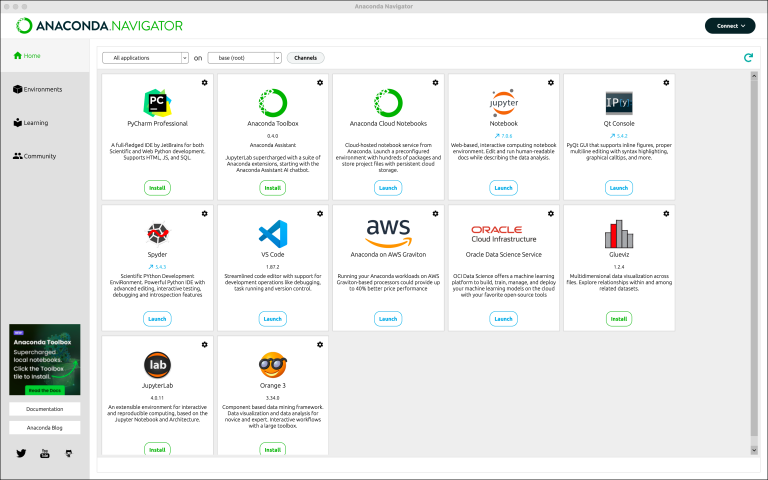
🔹 Anaconda Navigator

A user-friendly app to launch:

  • Jupyter Notebook

  • Spyder

  • VS Code (if installed)

  • Manage environments

Or use Anaconda Prompt to run commands.

nav tabs

Create a Virtual Environment (Optional but useful)

				
					conda create -n myenv python=3.10
conda activate myenv


This creates a clean environment to install project-specific packages.

Install Python Packages with "conda"

				
					conda install numpy pandas matplotlib


Final Thoughts

Anaconda is the perfect starting point if you’re entering Python from a scientific or educational background.
It saves time, prevents technical headaches, and helps you stay focused on what really matters: learning and exploring.

Scroll to Top