
Python is one of the easiest and most powerful programming languages to learn. Whether you’re planning to explore data science, artificial intelligence, or bioinformatics, Python is the perfect place to begin.
This post introduces the basic concepts you need to start coding!
What Is Python?
Python is a general-purpose programming language known for its readable syntax and broad applications — from web development to bioinformatics and AI.
Install Python
-
Install the latest stable version (preferably Python 3.11 or above).
-
During installation, check “Add Python to PATH”.
Code Editor
Anaconda Distribution:
Guide in a separate post >> Click here
Choose Your Code Editor
In addition to Jupyter Notebook (included in Anaconda), you’ll need a more robust editor for long-term projects:
Spyder (Already installed with Anaconda)
-
Ideal for scientific computing and data analysis
-
MATLAB-style interface
You can launch both from Anaconda Navigator or from the terminal/command prompt.
Install Core Python Libraries
-
In your Conda environment (create one if you haven’t), install key packages:
numpy: math and arrayspandas: data tablesmatplotlib: plotting
conda install numpy
Python Core Topics
- variables, data types
-
if/else, loops (
for,while) -
functions (
def,return) -
lists, dictionaries, sets, tuples
-
importing modules (
import) -
basic file reading/writing
- error handling (
try,except)
What Are Variables?
A variable in Python is a name that refers to a value stored in memory. You use variables to store and manipulate data in your programs.
We have 4 basic types of variables in Python: Integer(int), float, String(str) and Boolean(bool)
You can see an example of each bellow:
					name = "Alice"         # string
age = 25               # integer
height = 1.68          # float
is_student = True      # boolean
Rules for Variable Names:
-
Must start with a letter (a-z, A-Z) or an underscore
_ -
Can include letters, digits, and underscores
-
Case-sensitive (
ageandAgeare different) -
Should not be a Python keyword (e.g.,
if,while,for,class) -
it is better if the name of your variable is descriptive.
Check Variable Type:
print(type(name)) # class 'str'
What Are if/else Statements in Python?
The if/else structure allows your code to make decisions based on conditions.
Basic syntax:
*Python uses indentation (usually 4 spaces) instead of {}
					if condition:
    # code runs if condition is True
elif another_condition:
    # code runs if the first condition is False, but this one is True
else:
    # code runs if all conditions are False
Comparison Operators:
| Operator | Meaning | Example |
|---|---|---|
== |
equal to | x == 10 |
!= |
not equal to | x != 10 |
> |
greater than | x > 10 |
< |
less than | x < 10 |
>= |
greater or equal | x >= 10 |
<= |
less or equal | x <= 10 |
Logical Operators:
| Operator | Meaning | Example |
|---|---|---|
and |
both must be True | x > 5 and x < 10 |
or |
at least one True | x < 5 or x > 10 |
not |
reverses True/False | not (x > 10) |
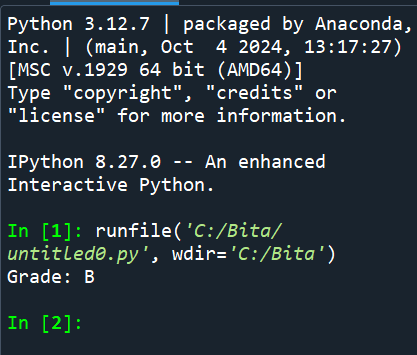
Example:
					score = 85
if score >= 90:
    print("Grade: A")
elif score >= 80:
    print("Grade: B")
elif score >= 70:
    print("Grade: C")
else:
    print("Grade: F")
What Are Loops in Python?
Loops let you repeat code multiple times until a condition is met.
We have 2 types of loops: for loop, and while loop.
					''' syntax of for loop'''
for variable in sequence:
    # code block

''' Example '''
for i in range(5):
    print(i)

'''output'''
0
1
2
3
4
					''' syntax of while loop'''
while condition:
    # code block

''' Example '''
count = 0
while count < 5:
    print(count)
    count += 1  # increase count by 1

'''output'''
0
1
2
3
4
Break / Continue:
-
Use
breakto exit the loop early. -
Use
continueto skip the current iteration and go to the next.
					''' Example '''
for i in range(10):
    if i == 5:
        break          # stops loop when i is 5
    if i % 2 == 0:
        continue       # skips even numbers
    print(i)

'''output'''
1
3
What Are Functions in Python?
Functions are reusable blocks of code that perform a specific task. They help organize your code, avoid repetition, and improve readability.
					''' Defining a function '''
def function_name(parameters):
    # code block
    return value  # optional

'''Example'''
def greet():
    print("Hello!")

greet()  # calls the function

'''output'''
Hello
					''' Example 2: Function with parameters and return value'''
def add(a, b):
    return a + b

result = add(3, 5)
print(result)


'''output'''
8
Notes:
defkeyword starts the function definition.- Parameters are inputs to the function.
returnsends back a value from the function.- If no
returnis specified, the function returnsNone.
					'''Example 3: Function with default parameter'''
def greet(name="Guest"):
    print(f"Hello, {name}!")

greet("Alice")  # Hello, Alice!
greet()         # Hello, Guest!
					'''Calling a function'''
function_name(arguments)
Why use functions?
-
Reusability
-
Modularity
-
Easy to debug and test
-
Cleaner code
What Are Lists in Python?
Ordered, mutable collections of items.
-
Use square brackets
[] -
Items can be different types
-
Mutable (can be changed)
					fruits = ["apple", "banana", "cherry"]
print(fruits[0])  # apple
fruits.append("orange")  # add item
fruits[1] = "blueberry"  # change item
What Are Dictionaries in Python?
Unordered, mutable collections of key-value pairs.
-
Use curly braces
{}with key:value pairs -
Keys must be immutable (strings, numbers, tuples)
-
Values can be any type
					student = {"name": "Ali", "age": 22, "major": "Biology"}
print(student["name"])  # Ali
student["age"] = 23     # update value
student["GPA"] = 3.8    # add new key-value
What Are Sets in Python?
Unordered collections of unique items.
-
Use curly braces
{}without key:value -
No duplicates allowed
-
Mutable, but elements must be immutable
					colors = {"red", "green", "blue"}
colors.add("yellow")     # add item
colors.remove("green")   # remove item
print("red" in colors)   # True
What Are Tuples in Python?
Ordered, immutable collections of items.
-
Use parentheses
() -
Cannot be changed after creation (immutable)
-
Useful for fixed data, like coordinates
					point = (10, 20)
print(point[0])  # 10
# point[0] = 15  # Error! Tuples cannot be changed
Summary Table:
| Structure | Ordered? | Mutable? | Syntax Example | Use Case |
|---|---|---|---|---|
| List | Yes | Yes | [1, 2, 3] |
Sequence of items |
| Dictionary | No | Yes | {"key": "value"} |
Key-value pairs |
| Set | No | Yes | {"a", "b", "c"} |
Unique items |
| Tuple | Yes | No | (1, 2, 3) |
Fixed collection of items |
How To Import Modules in Python?
Modules are pre-written Python files containing functions, classes, or variables you can reuse.
					''' Basic Import'''
import math
print(math.sqrt(16))  # 4.0

''' Import specific functions or classes'''
from math import sqrt, pi
print(sqrt(25))  # 5.0
print(pi)        # 3.141592653589793

'''Import with alias'''
import numpy as np
arr = np.array([1, 2, 3])
print(arr)
How To Read and Write Files in Python?
-
"w"mode means write (creates or overwrites the file). -
withautomatically closes the file after the block. "r"mode means read."a"mode means append (adds to the end without deleting existing content).
					'''  Writing to a file'''
with open("example.txt", "w") as file:
    file.write("Hello, world!\n")
    file.write("This is a file.")

''' Reading from a file'''
with open("example.txt", "r") as file:
    content = file.read()
    print(content)


'''Reading line by line'''
with open("example.txt", "r") as file:
    for line in file:
        print(line.strip())  # remove newline characters

'''Append to a file'''
with open("example.txt", "a") as file:
    file.write("\nAppending this line.")
How To Handle Errors in Python?
Sometimes your code can cause errors (exceptions), like dividing by zero or reading a missing file. To prevent the program from crashing, use try and except blocks to catch and handle errors gracefully.
					'''  Basic syntax '''
try:
    # code that might raise an error
    result = 10 / 0
except ZeroDivisionError:
    # code to handle the error
    print("You cannot divide by zero!")

''' Output '''
You cannot divide by zero!


'''Catch any error'''
try:
    x = int(input("Enter a number: "))
    print(10 / x)
except:
    print("Something went wrong.")


'''Catch specific errors'''
try:
    x = int(input("Enter a number: "))
    print(10 / x)
except ValueError:
    print("Please enter a valid integer.")
except ZeroDivisionError:
    print("Cannot divide by zero.")
It is also possible to use else and finally:
-
elseruns if no error occurs. -
finallyruns no matter what (usually for cleanup).
					try:
    x = int(input("Enter a number: "))
    result = 10 / x
except ZeroDivisionError:
    print("Cannot divide by zero.")
except ValueError:
    print("Invalid input.")
else:
    print(f"Result is {result}")
finally:
    print("Execution finished.")